


1、故事机内容介绍

科学真好玩故事机,适合4-12岁。
包含8大科普主题,160个科普冒险故事及核心知识。
主要以动物、恐龙、生活科学、太空、交通工具、身体、生活安全、食物安全等故事,用精准的科学原理讲解问题,知识精准不出错。
让孩子一面了解世界,
内容包含:
| 文件名称 | 分类篇目 | 起始编号 | 结束编号 | 内含集数 (不含起始) |
|---|---|---|---|---|
| A001.mp3 | 动物篇 | A001 | A021 | 20 |
| A022.mp3 | 恐龙篇 | A022 | A042 | 20 |
| A043.mp3 | 生活科学篇 | A043 | A063 | 20 |
| A064.mp3 | 太空篇 | A064 | A084 | 20 |
| A085.mp3 | 交通工具篇 | A085 | A105 | 20 |
| A106.mp3 | 身体篇 | A106 | A126 | 20 |
| A127.mp3 | 生活安全篇 | A127 | A147 | 20 |
| A148.mp3 | 食物安全篇 | A148 | A168 | 20 |
总计文件:168个 smp 如何不包含
1、原始数据内容目录声音8个就是168个文件。
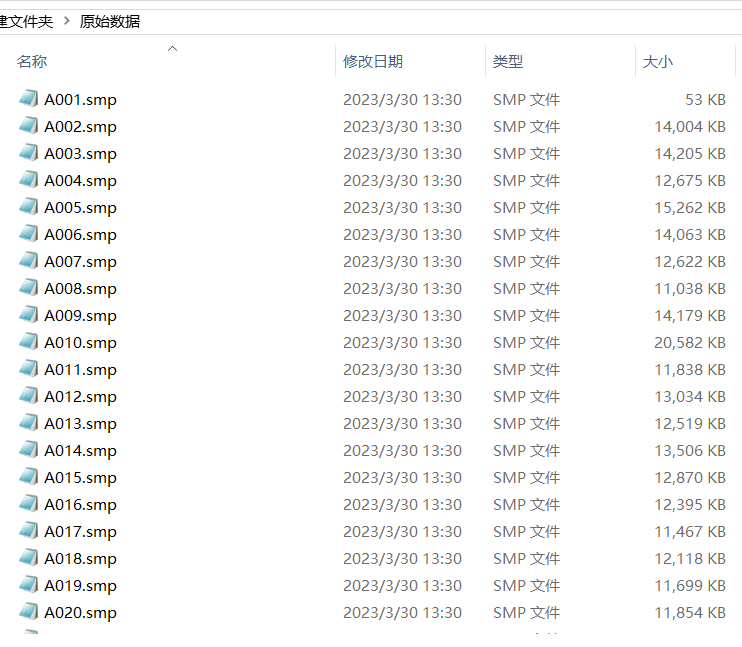
2、首先把smp转成mp3格式
说明:他的16进制密钥为:1a 42 86 07
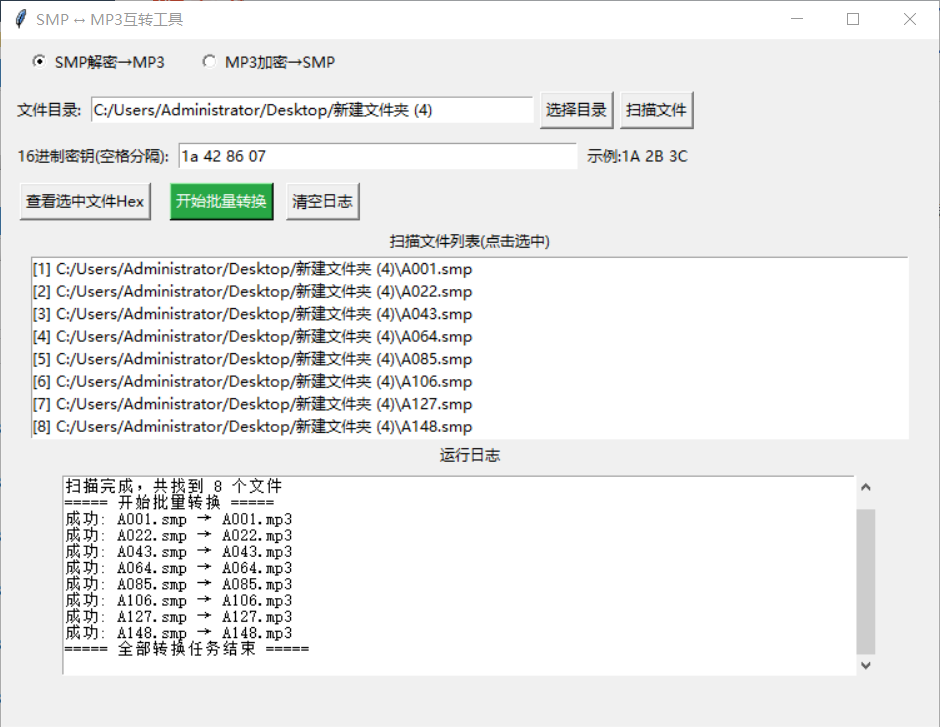
import os
import re
import tkinter as tk
from tkinter import filedialog, messagebox, scrolledtext

SOURCE_EXT = "smp"
SAVE_EXT = "mp3"


def get_file_extension(file_name):
    fname = file_name.lower()
    last_dot = fname.rfind(".")
    if last_dot > 0 and last_dot != len(fname) - 1:
        return fname[last_dot + 1:]
    return ""


def deep_scan_files_by_ext(root_path, ext):
    result = []
    if not os.path.exists(root_path):
        return result
    if os.path.isfile(root_path):
        file_ext = get_file_extension(root_path)
        if file_ext.lower() == ext.lower():
            result.append(root_path)
        return result
    for root, _, files in os.walk(root_path):
        for file in files:
            file_ext = get_file_extension(file)
            if file_ext.lower() == ext.lower():
                result.append(os.path.join(root, file))
    return result


def read_file_to_bytes(file_path):
    with open(file_path, "rb") as f:
        return f.read()


def xor_crypt(data, key):
    key_len = len(key)
    return bytes([b ^ key[i % key_len] for i, b in enumerate(data)])


def save_file_to_hex(file_path):
    save_path = file_path + ".hex.txt"
    data = read_file_to_bytes(file_path)
    with open(save_path, "w", encoding="utf-8") as f:
        line = []
        for idx, b in enumerate(data):
            line.append(f"{b:02X} ")
            if (idx + 1) % 16 == 0:
                f.write("".join(line) + "\r\n")
                line = []
        if line:
            f.write("".join(line))
    return save_path


def save_bytes_to_file(data, file_path):
    with open(file_path, "wb") as f:
        f.write(data)
    return True


class SmpMp3Gui:
    def __init__(self, root):
        self.root = root
        self.root.title("SMP ↔ MP3互转工具")
        self.root.geometry("750x550")
        self.file_list = []
        self.select_mode = tk.IntVar(value=1)

        # 模式选择
        frame_mode = tk.Frame(root)
        frame_mode.pack(fill=tk.X, padx=10, pady=5)
        tk.Radiobutton(frame_mode, text="SMP解密→MP3", variable=self.select_mode, value=1).pack(side=tk.LEFT, padx=10)
        tk.Radiobutton(frame_mode, text="MP3加密→SMP", variable=self.select_mode, value=2).pack(side=tk.LEFT, padx=10)

        # 路径选择
        frame_path = tk.Frame(root)
        frame_path.pack(fill=tk.X, padx=10, pady=5)
        tk.Label(frame_path, text="文件目录:").pack(side=tk.LEFT)
        self.path_var = tk.StringVar()
        tk.Entry(frame_path, textvariable=self.path_var, width=50).pack(side=tk.LEFT, padx=5)
        tk.Button(frame_path, text="选择目录", command=self.choose_dir).pack(side=tk.LEFT)
        tk.Button(frame_path, text="扫描文件", command=self.scan_file).pack(side=tk.LEFT, padx=5)

        # 密钥输入
        frame_key = tk.Frame(root)
        frame_key.pack(fill=tk.X, padx=10, pady=5)
        tk.Label(frame_key, text="16进制密钥(空格分隔):").pack(side=tk.LEFT)
        self.key_var = tk.StringVar()
        tk.Entry(frame_key, textvariable=self.key_var, width=45).pack(side=tk.LEFT, padx=5)
        tk.Label(frame_key, text="示例:1A 2B 3C").pack(side=tk.LEFT)

        # 功能按钮
        frame_btn = tk.Frame(root)
        frame_btn.pack(fill=tk.X, padx=10, pady=5)
        tk.Button(frame_btn, text="查看选中文件Hex", command=self.show_hex).pack(side=tk.LEFT, padx=5)
        tk.Button(frame_btn, text="开始批量转换", command=self.start_convert, bg="#28a745", fg="white").pack(side=tk.LEFT, padx=10)
        tk.Button(frame_btn, text="清空日志", command=self.clear_log).pack(side=tk.LEFT)

        # 文件列表
        tk.Label(root, text="扫描文件列表(点击选中)").pack()
        self.list_box = tk.Listbox(root, width=100, height=8)
        self.list_box.pack(padx=10)

        # 日志输出
        tk.Label(root, text="运行日志").pack()
        self.log_text = scrolledtext.ScrolledText(root, width=90, height=12)
        self.log_text.pack(padx=10, pady=5)

    def log(self, msg):
        self.log_text.insert(tk.END, f"{msg}\n")
        self.log_text.see(tk.END)
        self.root.update()

    def clear_log(self):
        self.log_text.delete(1.0, tk.END)

    def choose_dir(self):
        path = filedialog.askdirectory(title="选择文件根目录")
        if path:
            self.path_var.set(path)

    def scan_file(self):
        self.list_box.delete(0, tk.END)
        root_path = self.path_var.get().strip()
        if not os.path.isdir(root_path):
            messagebox.showerror("错误", "请选择有效文件夹!")
            return
        mode = self.select_mode.get()
        if mode == 1:
            self.file_list = deep_scan_files_by_ext(root_path, SOURCE_EXT)
        else:
            self.file_list = deep_scan_files_by_ext(root_path, SAVE_EXT)
        for idx, path in enumerate(self.file_list):
            self.list_box.insert(tk.END, f"[{idx+1}] {path}")
        self.log(f"扫描完成,共找到 {len(self.file_list)} 个文件")

    def show_hex(self):
        sel = self.list_box.curselection()
        if not sel:
            messagebox.showinfo("提示", "请先在列表中选中一个文件")
            return
        idx = sel[0]
        file_path = self.file_list[idx]
        try:
            hex_path = save_file_to_hex(file_path)
            self.log(f"Hex文本已保存至: {hex_path}")
            messagebox.showinfo("完成", f"Hex文件保存成功!\n{hex_path}")
        except Exception as e:
            self.log(f"生成Hex失败: {str(e)}")

    def get_key_bytes(self):
        key_str = self.key_var.get().strip().upper()
        if not key_str:
            messagebox.showerror("错误", "请输入16进制密钥!")
            return None
        if not re.fullmatch(r"^[A-F0-9 ]+$", key_str):
            messagebox.showerror("错误", "密钥格式错误,仅支持大写16进制+空格分隔")
            return None
        try:
            parts = key_str.split()
            return bytes([int(p, 16) for p in parts])
        except:
            messagebox.showerror("错误", "密钥解析失败,请检查格式")
            return None

    def start_convert(self):
        if not self.file_list:
            messagebox.showwarning("提示", "请先扫描文件!")
            return
        key = self.get_key_bytes()
        if not key:
            return
        mode = self.select_mode.get()
        self.log("===== 开始批量转换 =====")
        for file_path in self.file_list:
            try:
                data = read_file_to_bytes(file_path)
                data = xor_crypt(data, key)
                if mode == 1:
                    out_path = re.sub(r"\.smp$", ".mp3", file_path, flags=re.IGNORECASE)
                else:
                    out_path = re.sub(r"\.mp3$", ".smp", file_path, flags=re.IGNORECASE)
                save_bytes_to_file(data, out_path)
                self.log(f"成功: {os.path.basename(file_path)} → {os.path.basename(out_path)}")
            except Exception as e:
                self.log(f"失败: {os.path.basename(file_path)} 错误:{str(e)}")
        self.log("===== 全部转换任务结束 =====")
        messagebox.showinfo("完成", "批量转换执行完毕,请查看日志!")


if __name__ == "__main__":
    win = tk.Tk()
    app = SmpMp3Gui(win)
    win.mainloop()
3、喜马拉雅下载音频下载
用到的工具:喜马拉雅xm文件解密工具
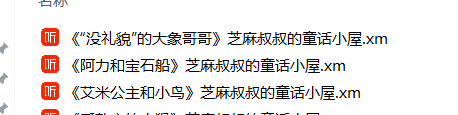
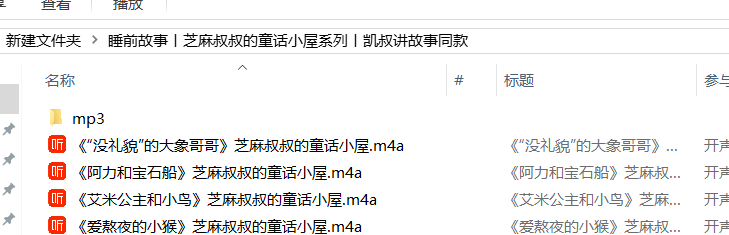
把喜马拉雅的.xm文件转成.m4a
转换前
转换后
4、把转换的m4a格式转成mp3
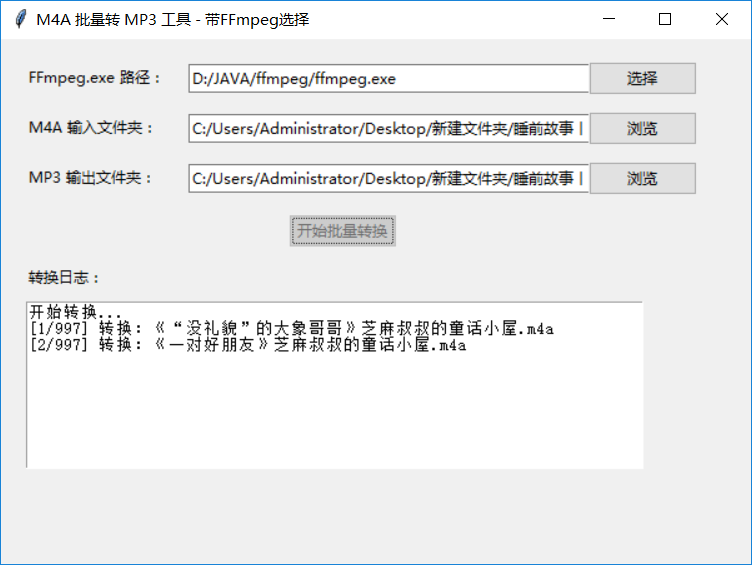
提供代码工具
import os
import tkinter as tk
from tkinter import ttk, filedialog, messagebox
import subprocess

class M4AtoMP3Converter:
    def __init__(self, root):
        self.root = root
        self.root.title("M4A 批量转 MP3 工具 - 带FFmpeg选择")
        self.root.geometry("600x420")

        # 变量
        self.ffmpeg_path = tk.StringVar()
        self.input_dir = tk.StringVar()
        self.output_dir = tk.StringVar()

        # ========== UI 界面 ==========
        # FFmpeg 选择
        ttk.Label(root, text="FFmpeg.exe 路径:").place(x=20, y=20)
        ttk.Entry(root, textvariable=self.ffmpeg_path, width=50).place(x=150, y=20)
        ttk.Button(root, text="选择", command=self.select_ffmpeg).place(x=470, y=18)

        # 输入文件夹
        ttk.Label(root, text="M4A 输入文件夹:").place(x=20, y=60)
        ttk.Entry(root, textvariable=self.input_dir, width=50).place(x=150, y=60)
        ttk.Button(root, text="浏览", command=self.select_input).place(x=470, y=58)

        # 输出文件夹
        ttk.Label(root, text="MP3 输出文件夹:").place(x=20, y=100)
        ttk.Entry(root, textvariable=self.output_dir, width=50).place(x=150, y=100)
        ttk.Button(root, text="浏览", command=self.select_output).place(x=470, y=98)

        # 转换按钮
        self.start_btn = ttk.Button(root, text="开始批量转换", command=self.start_convert)
        self.start_btn.place(x=230, y=140)

        # 日志框
        ttk.Label(root, text="转换日志:").place(x=20, y=180)
        self.log_text = tk.Text(root, width=70, height=10)
        self.log_text.place(x=20, y=210)

    def log(self, msg):
        self.log_text.insert(tk.END, msg + "\n")
        self.log_text.see(tk.END)
        self.root.update()

    def select_ffmpeg(self):
        path = filedialog.askopenfilename(title="选择 ffmpeg.exe", filetypes=[("FFmpeg", "ffmpeg.exe")])
        if path:
            self.ffmpeg_path.set(path)

    def select_input(self):
        path = filedialog.askdirectory(title="选择包含 M4A 的文件夹")
        if path:
            self.input_dir.set(path)

    def select_output(self):
        path = filedialog.askdirectory(title="选择 MP3 输出文件夹")
        if path:
            self.output_dir.set(path)

    def start_convert(self):
        ff = self.ffmpeg_path.get().strip()
        in_dir = self.input_dir.get().strip()
        out_dir = self.output_dir.get().strip()

        if not ff or not os.path.exists(ff):
            messagebox.showerror("错误", "请选择有效的 ffmpeg.exe")
            return
        if not in_dir or not os.path.isdir(in_dir):
            messagebox.showerror("错误", "请选择输入文件夹")
            return
        if not out_dir or not os.path.isdir(out_dir):
            messagebox.showerror("错误", "请选择输出文件夹")
            return

        self.start_btn.config(state=tk.DISABLED)
        self.log("开始转换...")

        files = [f for f in os.listdir(in_dir) if f.lower().endswith(".m4a")]
        if not files:
            self.log("未找到任何 M4A 文件")
            self.start_btn.config(state=tk.NORMAL)
            return

        for idx, file in enumerate(files, 1):
            name = os.path.splitext(file)[0]
            m4a = os.path.join(in_dir, file)
            mp3 = os.path.join(out_dir, name + ".mp3")

            self.log(f"[{idx}/{len(files)}] 转换:{file}")

            cmd = [
                ff,
                "-i", m4a,
                "-vn",
                "-c:a", "libmp3lame",
                "-q:a", "0",
                mp3,
                "-y",
                "-hide_banner",
                "-loglevel", "error"
            ]

            try:
                subprocess.run(cmd, check=True)
            except Exception as e:
                self.log(f"失败:{str(e)}")

        self.log("✅ 全部转换完成!")
        self.start_btn.config(state=tk.NORMAL)

if __name__ == "__main__":
    root = tk.Tk()
    app = M4AtoMP3Converter(root)
    root.mainloop()
5、把转换好的mp3分割处理前面的广告
备注:因为很多音频前面废话太多。例如我要批量去掉文件夹下面的所有mp3 固定10秒
@echo off
setlocal enabledelayedexpansion
:: 切掉前N秒,这里改成你要的秒数
set TRIM_SEC=21
:: 输出到子文件夹
mkdir trimmed 2>nul

for %%f in (*.mp3) do (
    echo 处理: %%f
    ffmpeg -ss %TRIM_SEC% -i "%%f" -c:a copy -q:a 0 "trimmed\%%f" -y
)
echo 完成!
pause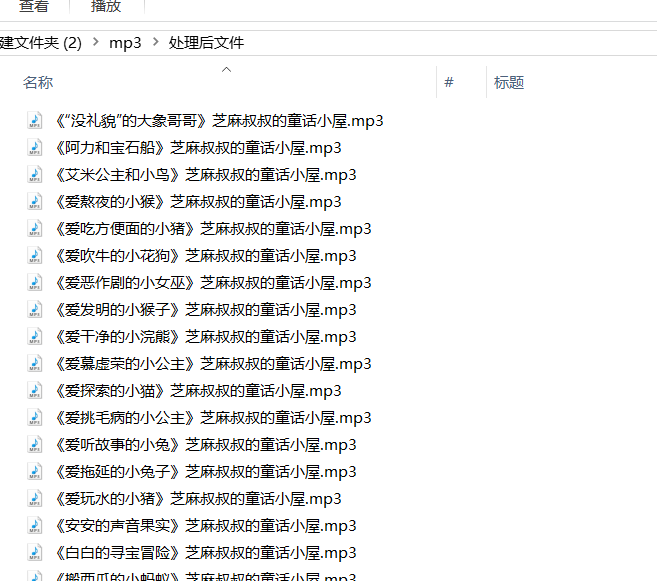
处理好以后,我们就得到了干净完整的儿童故事文件
6、分类
import os
import tkinter as tk
from tkinter import ttk, filedialog, messagebox
import subprocess

def gb2byte(gb):
    return gb * 1024 ** 3
def byte2gb(b):
    return round(b / 1024 ** 3, 3)
def num2a(n):
    return f"A{n:03d}"

class Mp3SuperTool:
    def __init__(self, root):
        self.root = root
        self.root.title("MP3 筛选分类分组合并 最终精准版")
        self.root.geometry("920x880")

        self.src_dir = tk.StringVar()
        self.max_total_gb = tk.StringVar(value="4")
        self.category_num = tk.StringVar(value="8")
        self.ffmpeg_path = tk.StringVar()

        self.selected_files = []
        self.categories = []
        self.group_counts = []
        self.category_names = [
            "动物篇","恐龙篇","生活科学篇","太空篇",
            "交通工具篇","身体篇","生活安全篇","食物安全篇"
        ]

        ttk.Label(root, text="MP3 源文件夹:").place(x=20, y=20)
        ttk.Entry(root, textvariable=self.src_dir, width=62).place(x=150, y=20)
        ttk.Button(root, text="浏览", command=self.select_dir).place(x=580, y=18)

        ttk.Label(root, text="内存卡上限 GB:").place(x=20, y=55)
        ttk.Entry(root, textvariable=self.max_total_gb, width=10).place(x=140, y=55)

        ttk.Label(root, text="分类数量:").place(x=220, y=55)
        ttk.Entry(root, textvariable=self.category_num, width=10).place(x=290, y=55)

        ttk.Label(root, text="FFmpeg.exe 路径:").place(x=20, y=90)
        ttk.Entry(root, textvariable=self.ffmpeg_path, width=55).place(x=150, y=90)
        ttk.Button(root, text="选择FFmpeg", command=self.select_ffmpeg).place(x=550, y=88)

        ttk.Button(root, text="1.筛选容量", command=self.step1_select).place(x=50, y=130)
        ttk.Button(root, text="2.均分分类", command=self.step2_category).place(x=180, y=130)
        ttk.Button(root, text="3.生成分类输入框", command=self.step3_create_inputs).place(x=310, y=130)
        ttk.Button(root, text="4.生成分组表格", command=self.step4_make_table).place(x=440, y=130)
        ttk.Button(root, text="5.合并所有音频", command=self.step5_merge).place(x=570, y=130)

        self.scroll_canvas = tk.Canvas(root, width=860, height=160)
        self.scroll_canvas.place(x=20, y=170)
        self.scrollbar = ttk.Scrollbar(root, orient=tk.VERTICAL, command=self.scroll_canvas.yview)
        self.scrollbar.place(x=880, y=170, height=160)
        self.scroll_canvas.configure(yscrollcommand=self.scrollbar.set)

        self.input_frame = ttk.Frame(self.scroll_canvas)
        self.scroll_canvas.create_window((0, 0), window=self.input_frame, anchor="nw")
        self.input_frame.bind("<Configure>", lambda e: self.scroll_canvas.configure(scrollregion=self.scroll_canvas.bbox("all")))
        self.input_entries = []

        ttk.Label(root, text="日志输出:").place(x=20, y=340)
        self.log = tk.Text(root, width=115, height=35)
        self.log.place(x=15, y=360)

        self.cat_range_info = []

    def select_dir(self):
        d = filedialog.askdirectory()
        if d:
            self.src_dir.set(d)

    def select_ffmpeg(self):
        p = filedialog.askopenfilename(filetypes=[("FFmpeg", "ffmpeg.exe")])
        if p:
            self.ffmpeg_path.set(p)

    def get_mp3(self):
        d = self.src_dir.get()
        if not os.path.isdir(d):
            return []
        arr = []
        for f in sorted(os.listdir(d)):
            if f.lower().endswith(".mp3"):
                p = os.path.join(d, f)
                s = os.path.getsize(p)
                arr.append({"name": f, "path": p, "size": s})
        return arr

    def step1_select(self):
        self.log.delete(1.0, tk.END)
        try:
            max_gb = float(self.max_total_gb.get())
        except:
            messagebox.showerror("错误", "请输入数字")
            return
        max_b = gb2byte(max_gb)
        all_mp3 = self.get_mp3()
        total = 0
        selected = []
        for f in all_mp3:
            if total + f["size"] <= max_b:
                selected.append(f)
                total += f["size"]
        self.selected_files = selected
        self.log.insert(tk.END, f"✅ 筛选完成:{len(selected)} 个文件 | {byte2gb(total)} GB\n\n")

    def step2_category(self):
        if not self.selected_files:
            messagebox.showwarning("提示", "请先执行步骤1")
            return
        cat_num = int(self.category_num.get())
        files = self.selected_files.copy()
        total = len(files)
        per = total // cat_num
        rem = total % cat_num
        categories = []
        idx = 0
        for i in range(cat_num):
            cnt = per + 1 if i < rem else per
            categories.append(files[idx:idx+cnt])
            idx += cnt
        self.categories = categories
        self.log.insert(tk.END, f"✅ 分类完成:共 {cat_num} 个分类,每个分类均有文件\n\n")

    def step3_create_inputs(self):
        for widget in self.input_frame.winfo_children():
            widget.destroy()
        self.input_entries.clear()
        cat_num = int(self.category_num.get())
        for i in range(cat_num):
            name = self.category_names[i] if i < len(self.category_names) else f"分类{i+1}"
            ttk.Label(self.input_frame, text=f"{name} 分成几组:").grid(row=i, column=0, padx=10, pady=8, sticky="w")
            entry = ttk.Entry(self.input_frame, width=12, font=("微软雅黑", 10))
            entry.insert(0, "20")
            entry.grid(row=i, column=1, padx=10, pady=8)
            self.input_entries.append(entry)
        self.log.insert(tk.END, "✅ 已生成分类分组输入框,请填写每组数量\n\n")

    def step4_make_table(self):
        if len(self.categories) != len(self.input_entries):
            messagebox.showerror("错误", "请先生成分类输入框")
            return
        self.group_counts = []
        for entry in self.input_entries:
            try:
                self.group_counts.append(int(entry.get().strip()))
            except:
                messagebox.showerror("错误", "请输入正确数字")
                return

        self.log.insert(tk.END, "="*110 + "\n")
        self.log.insert(tk.END, "文件名称\t分类篇目\t起始编号\t结束编号\t内含集数(不含起始)\n")
        self.log.insert(tk.END, "="*110 + "\n")

        self.final_groups = []
        self.cat_range_info.clear()
        now_start = 1

        for idx, cat_files in enumerate(self.categories):
            group_cnt = self.group_counts[idx]
            cat_name = self.category_names[idx]
            total_f = len(cat_files)
            avg = total_f // group_cnt
            rest = total_f % group_cnt

            groups = []
            pos = 0
            for g in range(group_cnt):
                take = avg + 1 if g < rest else avg
                groups.append(cat_files[pos:pos+take])
                pos += take
            self.final_groups.append(groups)

            # 严格对齐你样板
            table_start = now_start
            table_end = now_start + group_cnt
            self.cat_range_info.append((table_start, table_end))

            self.log.insert(tk.END, f"{num2a(table_start)}.mp3\t{cat_name}\t{num2a(table_start)}\t{num2a(table_end)}\t{group_cnt}\n")
            now_start = table_end + 1

        self.log.insert(tk.END, "="*110 + "\n✅ 表格生成完毕,格式完全匹配样板\n\n")

    def step5_merge(self):
        if not self.cat_range_info:
            messagebox.showwarning("提示", "请先生成分组表格")
            return
        ff = self.ffmpeg_path.get()
        if not os.path.exists(ff):
            messagebox.showerror("错误", "请选择ffmpeg.exe")
            return

        out_root = os.path.join(self.src_dir.get(), "【最终分类合并结果】")
        os.makedirs(out_root, exist_ok=True)

        for i, groups in enumerate(self.final_groups):
            cat_name = self.category_names[i]
            start_num, end_num = self.cat_range_info[i]
            folder = os.path.join(out_root, f"{i+1}_{cat_name}")
            os.makedirs(folder, exist_ok=True)
            # 合成文件从 起始+1 开始
            curr = start_num + 1
            for file_group in groups:
                out_name = num2a(curr)
                curr += 1
                list_txt = os.path.join(folder, "tmp_list.txt")
                with open(list_txt, "w", encoding="utf-8") as f:
                    for mp in file_group:
                        f.write(f"file '{mp['path']}'\n")
                out_mp3 = os.path.join(folder, f"{out_name}.mp3")
                cmd = [ff, "-f", "concat", "-safe", "0", "-i", list_txt, "-c", "copy", out_mp3, "-y"]
                subprocess.run(cmd, capture_output=True)
                os.remove(list_txt)

        self.log.insert(tk.END, "🎉 全部合并完成,编号格式完全符合要求!\n")
        messagebox.showinfo("完成", "分类、表格、音频命名全部对齐标准格式")

if __name__ == "__main__":
    root = tk.Tk()
    app = Mp3SuperTool(root)
    root.mainloop()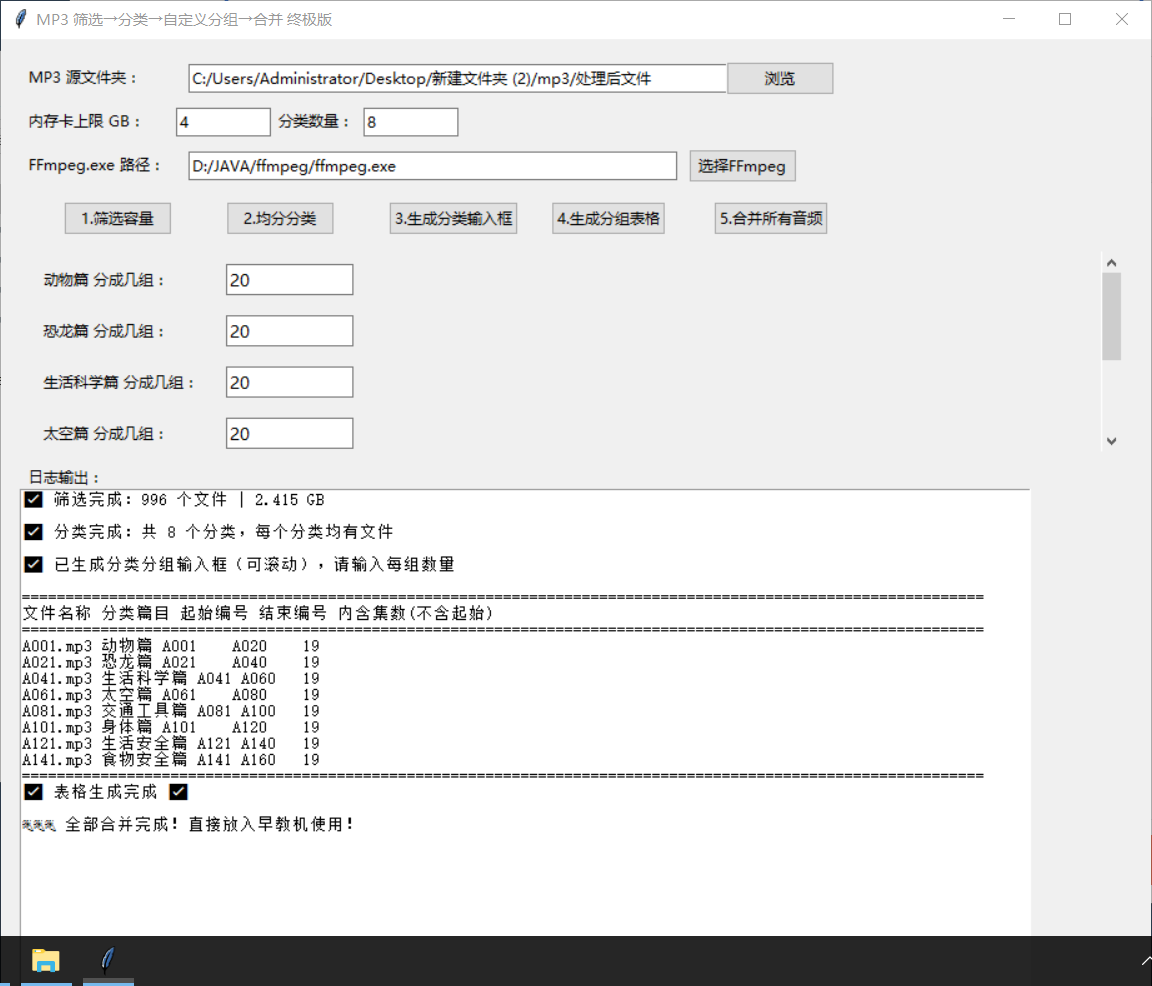
把分类号的mp3 放到一个文件夹里面
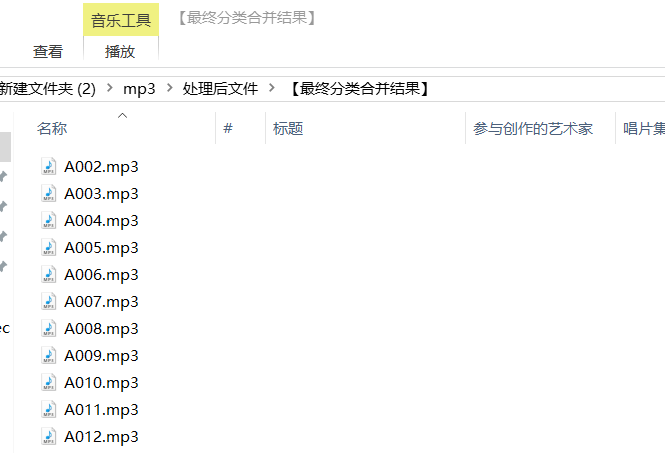
7、把整合好的mp3转成smp格式
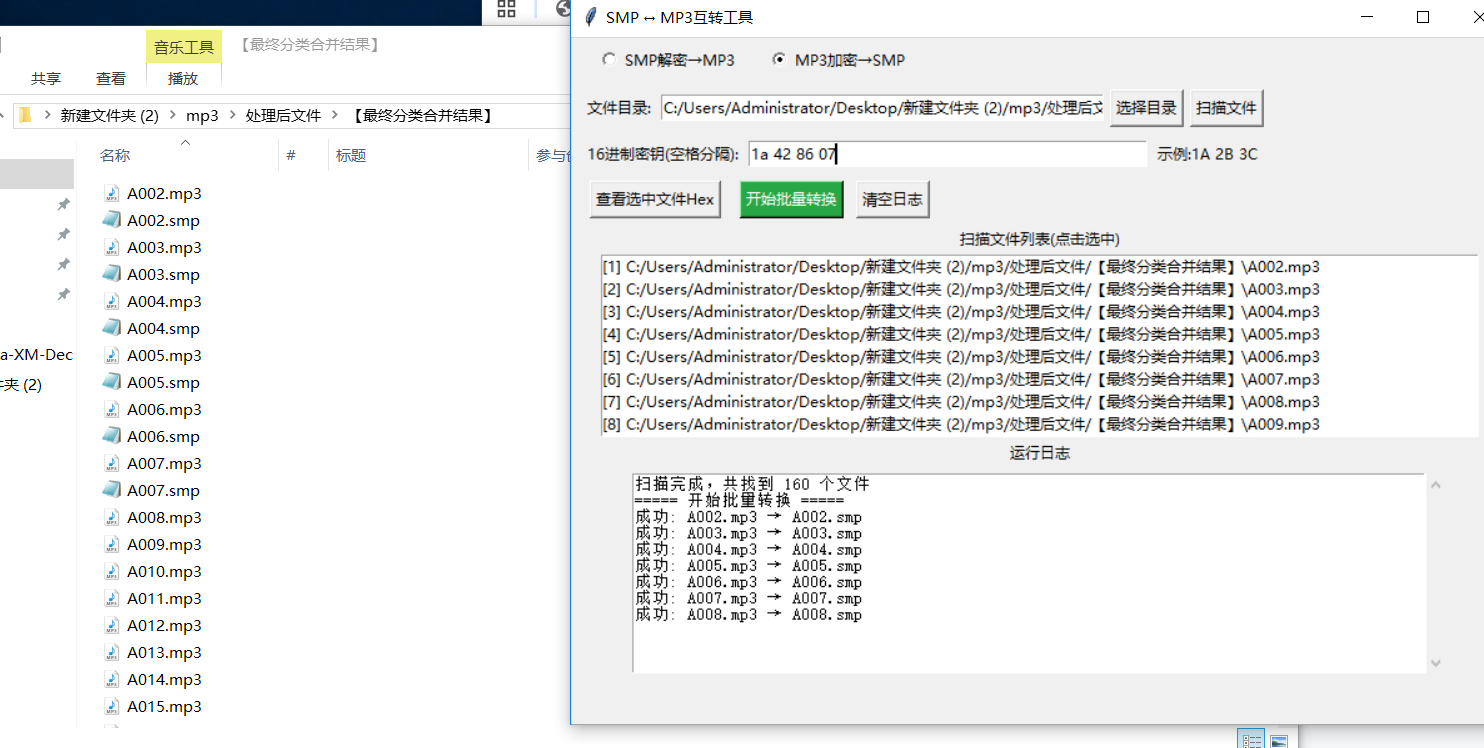
转好以后,把原始目录文件复制到转好的文件夹
下面是原始的目录音频
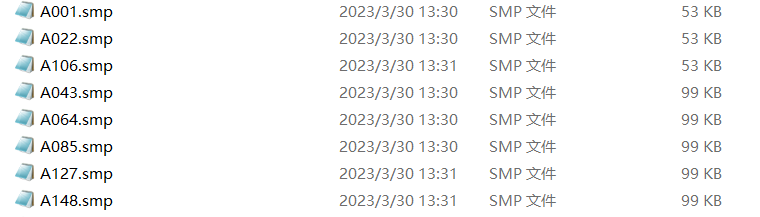
8、复制到内存卡里面,完成 总计168份音频。完美!!!这样就超过原始数据太多太多。以前只有160个音频,现在我能塞入总计:2000-3000个音频
内容均为本人原创.帖子留言,如果你有其他凯叔机器,需要置换内容的请联系我。
转载自 CSDN-专业IT技术社区
原文链接:https://blog.csdn.net/weixin_48969002/article/details/161148678

