

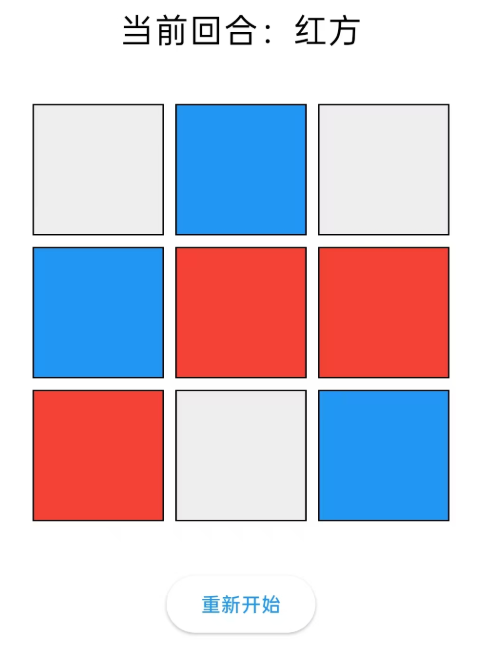
效果图
结构
DotItem 像素点类
FaceItem 画布类
DemoPage UI类
DotItem
import 'dart:ui';

import 'package:flutter/material.dart';
import 'package:flutter_colorpicker/flutter_colorpicker.dart';


class DotItem {

  //坐标
  late int x;
  late int y;

  //颜色
  Color color = Colors.transparent;

  //构造函数
  DotItem(this.x,this.y);

  //Map转对象:从 Map 里读出数据,还原成一个 DotItem 对象。
  DotItem.from(Map<String,dynamic> map){
    x = map["x"];
    y = map["y"];
    color = (map["color"]).color;
  }

  @override
  String toString(){ //把对象转成字符串,序列化:把对象直接转成一段 JSON 格式的字符串
    return '{"x":$x,"y":$y,"color":"${color.toHexString()}"}'; //这里的toHexString方法,需要引入外部类:flutter_colorpicker
  }

  Map<String,dynamic> toMap(){ //对象转成Map,序列化,
    return {"x":x,"y":y,"color":color.toHexString()};
  }

}
FaceItem
import 'dart:convert';
import 'dart:ui';

import 'package:flutter/material.dart';
import 'package:my_flutter/pixel/dot_item.dart';

class FaceItem {

  //宽高
  late int width;
  late int height;

  //二维列表:存储所有像素点
  final items = <List<DotItem>>[];

  //构造函数(建立坐标点)
  FaceItem(this.width,this.height) {
    for(int y = 0; y < height; y ++) { ///按行优先存储
      final list = <DotItem>[]; //新建一行
      for(int x = 0; x < width; x ++) { //内层:这一行从左到右
        list.add(DotItem(x,y));
      }
      items.add(list); //一行攒完,加入矩阵
    }
  }

  //设置像素颜色
  void setValue({required int x,required int y,required Color value}){
    if(x >= width || y >= height || x < 0 || y < 0) return;
    items[y][x].color = value;
  }

}
DemoPage
import 'package:flutter/cupertino.dart';
import 'package:flutter/material.dart';
import 'package:my_flutter/pixel/face_item.dart';

class DemoPage extends StatefulWidget {
  const DemoPage({super.key});

  @override
  State<StatefulWidget> createState() => _DemoPageState();
}

//做一个3x3的小游戏
class _DemoPageState extends State<DemoPage>  {

  late FaceItem faceItem;
  Color currentPlayer = Colors.red; //当前下棋的颜色
  String winnerText = ""; //胜利提示

  @override
  void initState() {
    super.initState();
    faceItem = FaceItem(3, 3);
  }

  //棋盘的点击事件
  void onCellTap(int x, int y) {

    //已经赢了,点击无效
    if (winnerText.isNotEmpty) return;

    //取出颜色值
    final dot = faceItem.items[y][x];
    if (dot.color != Colors.transparent) return;

    setState(() {
      dot.color = currentPlayer;//把当前点设置颜色

      final winner = checkWinner();//是否有赢家

      if (winner != null) {
        winnerText = winner == Colors.red ? "红方赢了" : "蓝方赢了";
      } else if (isBoardFull()) {
        winnerText = "平局";
      } else { //切换对手
        currentPlayer = currentPlayer == Colors.red ? Colors.blue : Colors.red;
      }
    });
  }

  //检查是否有赢家
  Color? checkWinner() {
    final items = faceItem.items;

    // 检查横线
    for (int y = 0; y < 3; y++) {
      if (items[y][0].color != Colors.transparent &&
          items[y][0].color == items[y][1].color &&
          items[y][1].color == items[y][2].color) {
        return items[y][0].color;
      }
    }

    // 检查竖线
    for (int x = 0; x < 3; x++) {
      if (items[0][x].color != Colors.transparent &&
          items[0][x].color == items[1][x].color &&
          items[1][x].color == items[2][x].color) {
        return items[0][x].color;
      }
    }

    // 左上到右下
    if (items[0][0].color != Colors.transparent &&
        items[0][0].color == items[1][1].color &&
        items[1][1].color == items[2][2].color) {
      return items[0][0].color;
    }

    // 右上到左下
    if (items[0][2].color != Colors.transparent &&
        items[0][2].color == items[1][1].color &&
        items[1][1].color == items[2][0].color) {
      return items[0][2].color;
    }

    return null;
  }

  //棋盘是否满了
  bool isBoardFull() {
    for (int y = 0; y < 3; y++) {
      for (int x = 0; x < 3; x++) {
        if (faceItem.items[y][x].color == Colors.transparent) {
          return false;
        }
      }
    }
    return true;
  }

  //重新开始
  void resetGame() {
    setState(() {
      faceItem = FaceItem(3, 3);
      currentPlayer = Colors.red;
      winnerText = "";
    });
  }


  @override
  Widget build(BuildContext context) {
    //计算当前回合文字
    final currentText = currentPlayer == Colors.red ? "红方" : "蓝方";

    return Scaffold(
      appBar: AppBar(
        leading: IconButton(
          onPressed: () {
            Navigator.pop(context);
          },
          icon: const Icon(Icons.arrow_back_ios),
        ),
        title: const Text("3x3小游戏"),
        centerTitle: true,
      ),
      body: Column(
        mainAxisAlignment: MainAxisAlignment.center,
        children: [
          Text(
            winnerText.isEmpty ? "当前回合:$currentText" : winnerText,//当前回合 / 胜利提示
            style: const TextStyle(fontSize: 24),
          ),

          const SizedBox(height: 30),

          Center(
            child: SizedBox(
              width: 300,
              height: 300,
              child: GridView.builder(
                itemCount: 9,
                gridDelegate: const SliverGridDelegateWithFixedCrossAxisCount(
                  crossAxisCount: 3,
                ),
                itemBuilder: (context, index) {
                  //把下标换算成二维矩阵的行列坐标
                  final x = index % 3; //取余
                  final y = index ~/ 3; //整除
                  final dot = faceItem.items[y][x]; //取值出来

                  return GestureDetector(
                    onTap: () {
                      onCellTap(x, y); //响应坐标的点击事件
                    },
                    child: Container(
                      margin: const EdgeInsets.all(4),
                      decoration: BoxDecoration(
                        color: dot.color == Colors.transparent
                            ? Colors.grey.shade200 //默认色
                            : dot.color, //用户设置
                        border: Border.all(color: Colors.black),
                      ),
                    ),
                  );
                },
              ),
            ),
          ),

          const SizedBox(height: 30),

          ElevatedButton(
            onPressed: resetGame,
            child: const Text("重新开始"),
          ),
        ],
      ),
    );
  }
}
转载自 CSDN-专业IT技术社区
原文链接:https://blog.csdn.net/m0_50891221/article/details/165754527

