


💁♂️个人主页:进击的荆棘
👇作者其它专栏:
目录
1.理解硬件
2.引入文件系统
3.ext2文件系统
4.软硬连接
3.ext2文件系统
3.3块组内部构成
3.3.1超级块(Super Block)
存放文件系统本身的结构信息,描述整个分区的文件系统信息。记录的信息主要有:block和inode的总量,未使用的block和inode的数量,一个block和inode的大小,最近一次挂载的时间,最近一次写入数据的时间,最近一次检验磁盘的时间等其它文件系统的相关信息。若Super Block的信息被破坏,可以说整个文件系统结构就被破坏了。
超级块在每个块组的开头都有一份拷贝(第一个快组必须有,后面的快组可以没有)。为了保证文件系统在磁盘部分扇区出现物理问题的情况下还能正常工作,就必须保证文件系统的Super Block信息在这种情况下也能正常访问。所以一个文件系统的Super Block会在多个Block Group中进行备份,这些Super Block区域的数据保持一致。
/*
* Structure of the super block
*/
struct ext2_super_block {
    __le32 s_inodes_count; /* Inodes count */
    __le32 s_blocks_count; /* Blocks count */
    __le32 s_r_blocks_count; /* Reserved blocks count */
    __le32 s_free_blocks_count; /* Free blocks count */
    __le32 s_free_inodes_count; /* Free inodes count */
    __le32 s_first_data_block; /* First Data Block */
    __le32 s_log_block_size; /* Block size */
    __le32 s_log_frag_size; /* Fragment size */
    __le32 s_blocks_per_group; /* # Blocks per group */
    __le32 s_frags_per_group; /* # Fragments per group */
    __le32 s_inodes_per_group; /* # Inodes per group */
    __le32 s_mtime; /* Mount time */
    __le32 s_wtime; /* Write time */
    __le16 s_mnt_count; /* Mount count */
    __le16 s_max_mnt_count; /* Maximal mount count */
    __le16 s_magic; /* Magic signature */
    __le16 s_state; /* File system state */
    __le16 s_errors; /* Behaviour when detecting errors */
    __le16 s_minor_rev_level; /* minor revision level */
    __le32 s_lastcheck; /* time of last check */
    __le32 s_checkinterval; /* max. time between checks */
    __le32 s_creator_os; /* OS */
    __le32 s_rev_level; /* Revision level */
    __le16 s_def_resuid; /* Default uid for reserved blocks */
    __le16 s_def_resgid; /* Default gid for reserved blocks */
    /*
    * These fields are for EXT2_DYNAMIC_REV superblocks only.
    *
    * Note: the difference between the compatible feature set and
    * the incompatible feature set is that if there is a bit set
    * in the incompatible feature set that the kernel doesn't
    * know about, it should refuse to mount the filesystem.
    *
    * e2fsck's requirements are more strict; if it doesn't know
    * about a feature in either the compatible or incompatible
    * feature set, it must abort and not try to meddle with
    * things it doesn't understand...
    */
    __le32 s_first_ino; /* First non-reserved inode */
    __le16 s_inode_size; /* size of inode structure */
    __le16 s_block_group_nr; /* block group # of this superblock */
    __le32 s_feature_compat; /* compatible feature set */
    __le32 s_feature_incompat; /* incompatible feature set */
    __le32 s_feature_ro_compat; /* readonly-compatible feature set */
    __u8 s_uuid[16]; /* 128-bit uuid for volume */
    char s_volume_name[16]; /* volume name */
    char s_last_mounted[64]; /* directory where last mounted */
    __le32 s_algorithm_usage_bitmap; /* For compression */
    /*
    * Performance hints. Directory preallocation should only
    * happen if the EXT2_COMPAT_PREALLOC flag is on.
    */
    __u8 s_prealloc_blocks; /* Nr of blocks to try to preallocate*/
    __u8 s_prealloc_dir_blocks; /* Nr to preallocate for dirs */
    __u16 s_padding1;
    /*
    * Journaling support valid if EXT3_FEATURE_COMPAT_HAS_JOURNAL set.
    */
    __u8 s_journal_uuid[16]; /* uuid of journal superblock */
    __u32 s_journal_inum; /* inode number of journal file */
    __u32 s_journal_dev; /* device number of journal file */
    __u32 s_last_orphan; /* start of list of inodes to delete */
    __u32 s_hash_seed[4]; /* HTREE hash seed */
    __u8 s_def_hash_version; /* Default hash version to use */
    __u8 s_reserved_char_pad;
    __u16 s_reserved_word_pad;
    __le32 s_default_mount_opts;
    __le32 s_first_meta_bg; /* First metablock block group */
    __u32 s_reserved[190]; /* Padding to the end of the block */
};
3.3.2GDT(Group Descriptor Table)
块组描述符表,描述块组属性信息,整个分区分成多个块组就对应多少个块组描述符。每个块组描述符存储一个块组的描述信息,如在这个块组中从哪里开始是inode Table,从哪里开始是Data Blocks,空闲的inode和数据块还有多少个等等。快组描述符在每个块组的开头都有一份拷贝。
// 磁盘级blockgroup的数据结构
/*
* Structure of a blocks group descriptor
*/
struct ext2_group_desc
{
    __le32 bg_block_bitmap; /* Blocks bitmap block */
    __le32 bg_inode_bitmap; /* Inodes bitmap */
    __le32 bg_inode_table; /* Inodes table block*/
    __le16 bg_free_blocks_count; /* Free blocks count */
    __le16 bg_free_inodes_count; /* Free inodes count */
    __le16 bg_used_dirs_count; /* Directories count */
    __le16 bg_pad;
    __le32 bg_reserved[3];
};
3.3.3块位图(Block Bitmap)
●Block Bitmap中记录着Data Block中哪些数据块已经被占用,哪些数据块没有被占用
3.3.4inode位图(Inode Bitmap)
●每个bit表示一个inode是否空闲可用
3.3.5inode节点表(Inode Table)
●存放文件属性,如文件大小,所有者,最近修改时间等
●当前分组所有Inode属性的集合
●inode编号以分区为单位,整体划分,不可跨分区
3.3.6Data Block
数据区:存放文件内容,也就是一个一个的Block。根据不同的文件类型有以下几种情况:
●对于普通文件,文件的数据存储在数据块中
●对于目录,该目录下的所有文件名和目录名存储在所在目录的数据块中,除了文件名外,ls -l命令看到的其它信息保存在该文件的inode中
●Block是按照分区划分的,不可跨分区
3.4inode和datablock映射
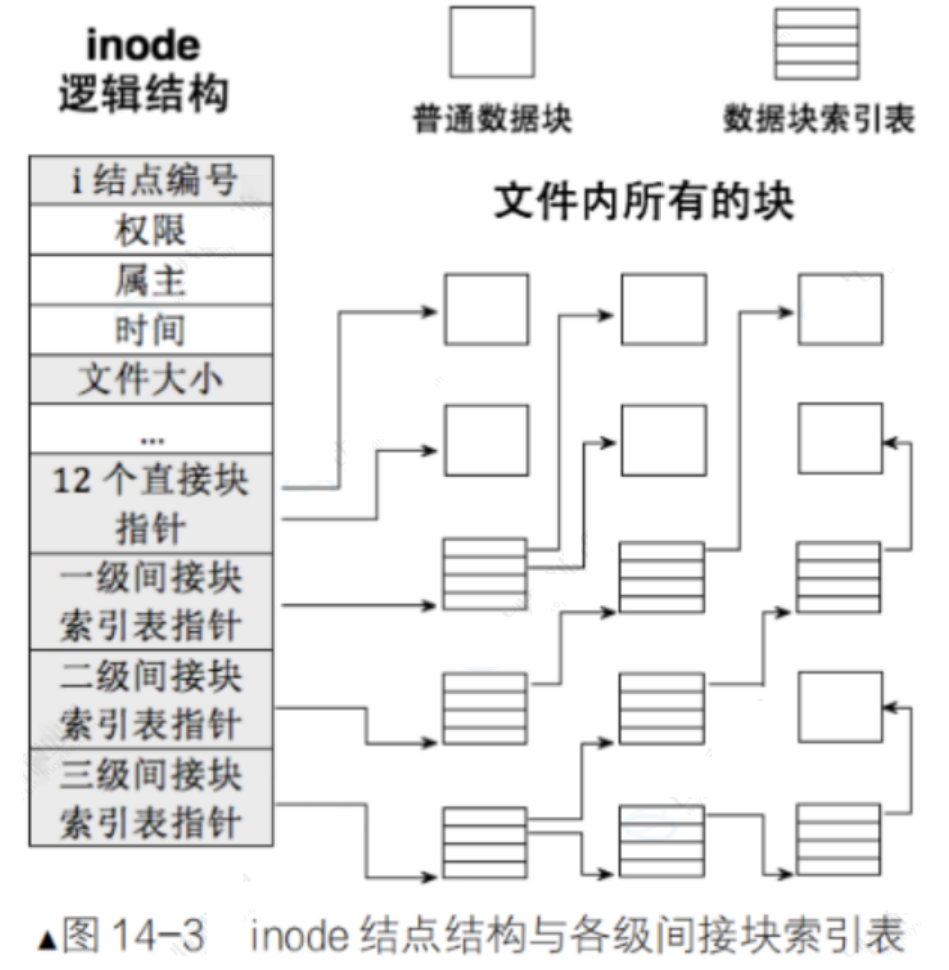
●inode内部存在__le 32 i_block[EXT2_N_BLOCKS];/* Pointers to block */,EXT2_N_BLOCKS=15,就是用来进行inode和block映射的
●这样文件=内容+属性,就都能找到了
/*
* Structure of an inode on the disk
*/
struct ext2_inode {
    __le16 i_mode; /* File mode */
    __le16 i_uid; /* Low 16 bits of Owner Uid */
    __le32 i_size; /* Size in bytes */
    __le32 i_atime; /* Access time */
    __le32 i_ctime; /* Creation time */
    __le32 i_mtime; /* Modification time */
    __le32 i_dtime; /* Deletion Time */
    __le16 i_gid; /* Low 16 bits of Group Id */
    __le16 i_links_count; /* Links count */
    __le32 i_blocks; /* Blocks count */
    __le32 i_flags; /* File flags */
    union {
        struct {
            __le32 l_i_reserved1;
        } linux1;
        struct {
            __le32 h_i_translator;
        } hurd1;
        struct {
            __le32 m_i_reserved1;
        } masix1;
    } osd1; /* OS dependent 1 */
    __le32 i_block[EXT2_N_BLOCKS];/* Pointers to blocks */
    __le32 i_generation; /* File version (for NFS) */
    __le32 i_file_acl; /* File ACL */
    __le32 i_dir_acl; /* Directory ACL */
    __le32 i_faddr; /* Fragment address */
    union {
        struct {
            __u8 l_i_frag; /* Fragment number */
            __u8 l_i_fsize; /* Fragment size */
            __u16 i_pad1;
            __le16 l_i_uid_high; /* these 2 fields */
            __le16 l_i_gid_high; /* were reserved2[0] */
            __u32 l_i_reserved2;
        } linux2;
        struct {
            __u8 h_i_frag; /* Fragment number */
            __u8 h_i_fsize; /* Fragment size */
            __le16 h_i_mode_high;
            __le16 h_i_uid_high;
            __le16 h_i_gid_high;
            __le32 h_i_author;
        } hurd2;
        struct {
            __u8 m_i_frag; /* Fragment number */
            __u8 m_i_fsize; /* Fragment size */
            __u16 m_pad1;
            __u32 m_i_reserved2[2];
        } masix2;
    } osd2; /* OS dependent 2 */
};

#define EXT2_NDIR_BLOCKS 12
#define EXT2_IND_BLOCK EXT2_NDIR_BLOCKS
#define EXT2_DIND_BLOCK (EXT2_IND_BLOCK + 1)
#define EXT2_TIND_BLOCK (EXT2_DIND_BLOCK + 1)
#define EXT2_N_BLOCKS (EXT2_TIND_BLOCK + 1)

//inode 的⼤⼩通常是 128 字节 或 256 字节
结论:
●分区之后的格式化操作,就是对分区进行分组,在每个分组中写入Super Block、GPT、Block Bitmap、Inode Bitmap等管理信息,这些管理信息统称:文件系统
●只要知道文件的inode号,就能在指定分区中确定是哪一个分组,进而在哪一个分组确定是哪一个inode
●拿到inode文件属性和内容就全部都有了
下面,通过touch一个新文件来看看如何工作
[root@localhost linux]# touch abc
[root@localhost linux]# ls -i abc
263466 abc
将上图简化:
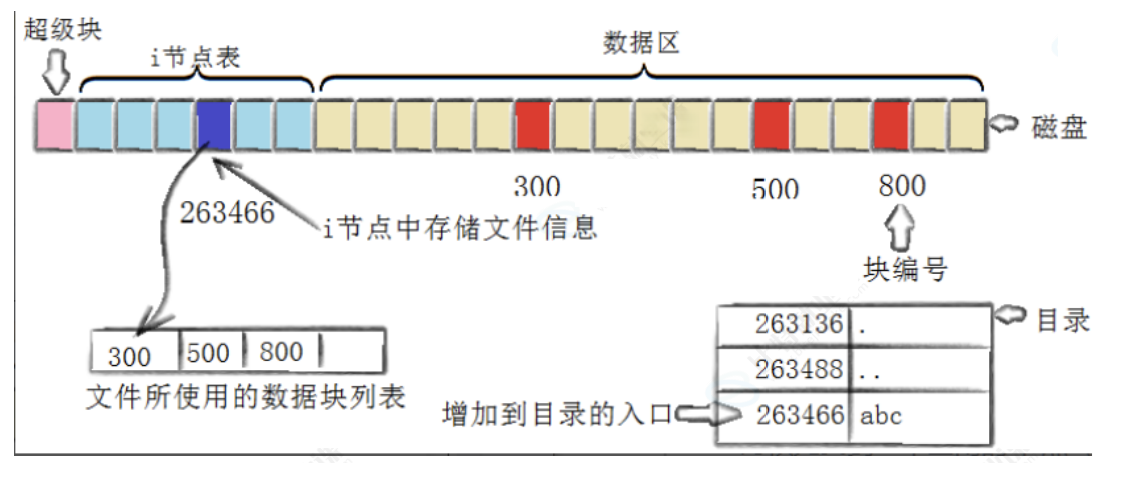
创建一个新文件主要有以下4个操作:
1.存储属性
内核先找到一个空闲的i节点(这里是263466)。内核把文件信息记录到其中
2.存储数据
该文件需要存储在三个磁盘块,内核找到了三个空闲块:300,500,800。将内核缓冲区的第一块数据复制到300,下一块复制到500,以此类推
3.记录分配情况
文件内容按顺序300,500,800存放。内核在inode上的磁盘分布区记录了上述块列表
4.添加目录名到目录
新的文件名abc。linux如何在当前目录记录这个文件?内核将入口(263466,abc)添加到目录文件。文件名和inode之间的对应关系将文件名和文件的内容及属性连接起来。
3.5目录与文件名
问题:
●访问文件,用的是文件名,没有用过inode号?
●目录是文件吗?如何理解?
答案:
●目录也是文件,但是磁盘上没有目录的概念,只有文件属性+文件内容的概念
●目录的属性不用多说,内容保存的是:文件名和inode号的映射关系
// readdir.c
#include <stdio.h>
#include <string.h>
#include <stdlib.h>
#include <dirent.h>
#include <sys/types.h>
#include <unistd.h>

int main(int argc, char *argv[]) {
    if (argc != 2) {
        fprintf(stderr, "Usage: %s <directory>\n", argv[0]);
        exit(EXIT_FAILURE);
    }
    DIR *dir = opendir(argv[1]); // 系统调⽤,⾃⾏查阅
    if (!dir) {
        perror("opendir");
        exit(EXIT_FAILURE);
    }
    struct dirent *entry;
    while ((entry = readdir(dir)) != NULL) { // 系统调⽤,⾃⾏查阅
        // Skip the "." and ".." directory entries
        if (strcmp(entry->d_name, ".") == 0 || strcmp(entry->d_name, "..")
        == 0) {
            continue;
        }
        printf("Filename: %s, Inode: %lu\n", entry->d_name, (unsigned
        long)entry->d_ino);
    }
    closedir(dir);
    return 0;
}

[sjx@VM-0-6-centos ~]$ ./readdir ~/linux
Filename: 26.07.09, Inode: 921392
Filename: 26.08.01, Inode: 920911
Filename: 26.08.06, Inode: 921427
Filename: 26.07.17, Inode: 921397
Filename: 26.07.28, Inode: 921400
Filename: 26.09.17, Inode: 1048637
Filename: README.en.md, Inode: 921401
Filename: 26.09.09, Inode: 667259
Filename: 26.07.14, Inode: 921394
Filename: 26.09.12, Inode: 658164
Filename: 26.09.08, Inode: 667319
Filename: 26.09.10, Inode: 667268
Filename: 26.07.16, Inode: 921396
Filename: 26.09.15, Inode: 921659
Filename: 26.07.31, Inode: 921414
Filename: 26.07.15, Inode: 921395
Filename: 26.07.22, Inode: 921399
Filename: 26.08.19, Inode: 921168
Filename: 26.07.13, Inode: 921393
Filename: processbar, Inode: 921403
Filename: 26.09.13, Inode: 1048609
Filename: README.md, Inode: 921402
Filename: 26.08.14, Inode: 658212
Filename: .git, Inode: 921160
Filename: 26.07.20, Inode: 921398
[sjx@VM-0-6-centos ~]$ ls -li ./linux
total 328
 921392 -rw-rw-r-- 1 sjx sjx 94337 Jul 31 17:59 26.07.09
 921393 -rw-rw-r-- 1 sjx sjx 26610 Jul 31 17:59 26.07.13
 921394 -rw-rw-r-- 1 sjx sjx   322 Jul 31 17:59 26.07.14
 921395 -rw-rw-r-- 1 sjx sjx 10821 Jul 31 17:59 26.07.15
 921396 -rw-rw-r-- 1 sjx sjx 16024 Jul 31 17:59 26.07.16
 921397 -rw-rw-r-- 1 sjx sjx  2830 Jul 31 17:59 26.07.17
 921398 -rw-rw-r-- 1 sjx sjx  5423 Jul 31 17:59 26.07.20
 921399 -rw-rw-r-- 1 sjx sjx 47971 Jul 31 17:59 26.07.22
 921400 -rw-rw-r-- 1 sjx sjx 20402 Jul 31 17:59 26.07.28
 921414 -rw-rw-r-- 1 sjx sjx  7727 Aug  1 03:08 26.07.31
 920911 -rw-rw-r-- 1 sjx sjx  7341 Aug  1 21:10 26.08.01
 921427 -rw-rw-r-- 1 sjx sjx 16371 Aug  6 23:45 26.08.06
 658212 drwxrwxr-x 2 sjx sjx  4096 Aug 14 23:46 26.08.14
 921168 drwxrwxr-x 2 sjx sjx  4096 Aug 19 18:33 26.08.19
 667319 -rw-rw-r-- 1 sjx sjx 14058 Sep  8 18:59 26.09.08
 667259 drwxrwxr-x 2 sjx sjx  4096 Sep  9 21:22 26.09.09
 667268 drwxrwxr-x 2 sjx sjx  4096 Sep 10 21:01 26.09.10
 658164 drwxrwxr-x 2 sjx sjx  4096 Sep 12 16:49 26.09.12
1048609 drwxrwxr-x 4 sjx sjx  4096 Sep 13 21:59 26.09.13
 921659 drwxrwxr-x 3 sjx sjx  4096 Sep 15 21:29 26.09.15
1048637 drwxrwxr-x 3 sjx sjx  4096 Sep 17 16:04 26.09.17
 921403 drwxrwxr-x 2 sjx sjx  4096 Jul 31 17:59 processbar
 921401 -rw-rw-r-- 1 sjx sjx   949 Jul 31 17:59 README.en.md
 921402 -rw-rw-r-- 1 sjx sjx  1310 Jul 31 17:59 README.md
3.6路径解析
问题:打开当前工作目录文件,查看当前工作目录文件的内容?当前工作目录不也是文件吗?我们访问当前工作目录不也是只知道当前工作目录的文件名吗?要访问它,不也得知道当前工作目录的inode吗?
答案1:所以也要打开:当前工作目录的上级目录,而上级目录也是目录,所以还是上面的问题
答案2:所以类似“递归”,需要把路径中所有的目录全部解析,出口是“/”根目录
最终答案3:实际上,任何文件都有路径,访问目标文件,如:/home/sjx/code/test/test/test.c都要从根目录开始,依次打开每一个目录,根据目录名,依次访问每个目录下指定的目录,直到访问到test.c。这个过程叫Linux路径解析
注:
●所以,这就是为什么访问文件必须要有目录+文件名=路径的原因
●根目录固定文件名,inode号,无需查找,系统开机后就必须知道
路径由谁提供?
●用户访问文件,都是指令/工具访问,本质是进程访问,进程有CWD,进程提供路径
●用户open文件,提供了路径
那最开始的路径从哪里来?
●Linux为什么要有根目录,根目录下为什么要有那么多缺省目录?
●用户为什么要有家目录,可以自己新建目录?
●上面所有行为:本质就是在磁盘文件系统中,新建目录文件。而新建的任何文件,都在用户或系统指定的目录下新建,这就是天然的路径
●系统+用户共同构建Linux路径结构
3.7路径缓存
问题1:Linux磁盘中,存在真正的目录吗?
答案:不存在,只有文件。只保存文件属性+文件内容
问题2:访问任何文件,都要从/目录开始进行路径解析?
答案:原则上是,但这样效率太低,所以Linux会缓存历史路径结构
问题3:Linux目录的概念,如何产生?
答案:打开的文件是目录的话,OS自己在内存中进行路径维护
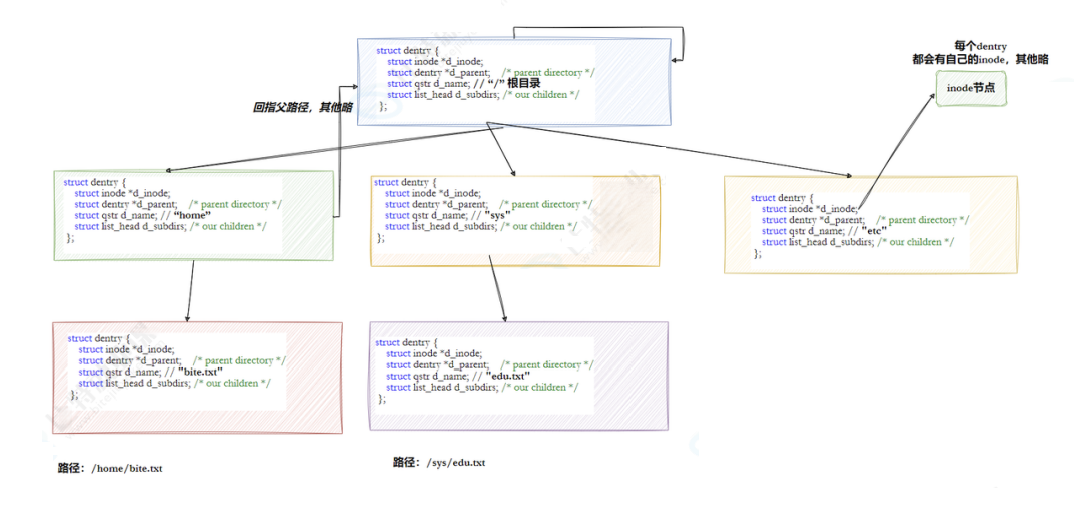
Linux中,内核维护树状路径结构的内核结构体叫做:struct dentry
struct dentry {
    atomic_t d_count;
    unsigned int d_flags; /* protected by d_lock */
    spinlock_t d_lock; /* per dentry lock */
    struct inode *d_inode; /* Where the name belongs to - NULL is
    * negative */
    /*
    * The next three fields are touched by __d_lookup. Place them here
    * so they all fit in a cache line.
    */
    struct hlist_node d_hash; /* lookup hash list */
    struct dentry *d_parent; /* parent directory */
    struct qstr d_name;
    struct list_head d_lru; /* LRU list */
    /*
    * d_child and d_rcu can share memory
    */
    union {
        struct list_head d_child; /* child of parent list */
        struct rcu_head d_rcu;
    } d_u;
    struct list_head d_subdirs; /* our children */
    struct list_head d_alias; /* inode alias list */
    unsigned long d_time; /* used by d_revalidate */
    struct dentry_operations *d_op;
    struct super_block *d_sb; /* The root of the dentry tree */
    void *d_fsdata; /* fs-specific data */
#ifdef CONFIG_PROFILING
    struct dcookie_struct *d_cookie; /* cookie, if any */
#endif
    int d_mounted;
    unsigned char d_iname[DNAME_INLINE_LEN_MIN]; /* small names */
};
注:
●每个文件起始都要有对应的dentry结构,包括普通文件。这样所有被打开的文件,就可以在内存中形成整个树形结构
●整个树形节点也同时会隶属于LRU(Least Rencently Used,最近最少打开)结构中,进行节点淘汰
●整个树形节点也同时会隶属于Hash,方便快速查找
●更重要的是,这个树形结构,整体构成了Linux的路径缓存结构,打开访问任何文件,都先在这棵树下根据路径进行查找,找到就返回inode和内容,没找到就从磁盘加载路径,添加dentry结构,缓存新路径
3.8挂载分区
我们已经能够根据inode号在指定分区找文件了,也已经能根据目录文件内容,找指定了inode了,在指定分区内,可以做任何事。但是:
问题:inode不是不能跨分区吗?Linux不是可以有多个分区吗?如何知道我在哪一个分区?
3.8.1例子
#制作一个大的磁盘块,就当作一个分区
[sjx@VM-0-6-centos ~]$ dd if=/dev/zero of=./disk.img bs=1M count=5
5+0 records in
5+0 records out
5242880 bytes (5.2 MB) copied, 0.00320102 s, 1.6 GB/s
[sjx@VM-0-6-centos ~]$ mkfs.ext4 disk.img    #格式化写入文件系统
mke2fs 1.42.9 (28-Dec-2013)
disk.img is not a block special device.
Proceed anyway? (y,n) y
Discarding device blocks: done
Filesystem label=
OS type: Linux
Block size=1024 (log=0)
Fragment size=1024 (log=0)
Stride=0 blocks, Stripe width=0 blocks
1280 inodes, 5120 blocks
256 blocks (5.00%) reserved for the super user
First data block=1
Maximum filesystem blocks=5242880
1 block group
8192 blocks per group, 8192 fragments per group
1280 inodes per group

Allocating group tables: done
Writing inode tables: done
Creating journal (1024 blocks): done
Writing superblocks and filesystem accounting information: done

[sjx@VM-0-6-centos ~]$ mkdir mydisk    #建立空目录
[sjx@VM-0-6-centos ~]$ df -h    #查看可以使用的分区
Filesystem      Size  Used Avail Use% Mounted on
devtmpfs        989M     0  989M   0% /dev
tmpfs          1000M   24K 1000M   1% /dev/shm
tmpfs          1000M  584K  999M   1% /run
tmpfs          1000M     0 1000M   0% /sys/fs/cgroup
/dev/vda1        40G  6.1G   32G  17% /
tmpfs           200M     0  200M   0% /run/user/0
tmpfs           200M     0  200M   0% /run/user/1001
[sjx@VM-0-6-centos ~]$ sudo mount -t ext4 ./disk.img ./mydisk    #将分区挂载到指定的分区
[sudo] password for sjx:
[sjx@VM-0-6-centos ~]$ ll
total 1165
-rw-rw-r--  1 sjx  sjx  5242880 Sep 29 16:42 disk.img
-rw-rw-r--  1 sjx  sjx      827 Jul 20 18:04 install.sh
drwxrwxr-x 13 sjx  sjx     4096 Sep 27 22:19 linux
-rw-rw-r--  1 sjx  sjx      625 Sep 10 20:18 Makefile
drwxr-xr-x  3 root root    1024 Sep 29 16:41 mydisk
[sjx@VM-0-6-centos ~]$ df -h
Filesystem      Size  Used Avail Use% Mounted on
devtmpfs        989M     0  989M   0% /dev
tmpfs          1000M   24K 1000M   1% /dev/shm
tmpfs          1000M  588K  999M   1% /run
tmpfs          1000M     0 1000M   0% /sys/fs/cgroup
/dev/vda1        40G  6.1G   32G  17% /
tmpfs           200M     0  200M   0% /run/user/0
tmpfs           200M     0  200M   0% /run/user/1001
/dev/loop0      3.9M   53K  3.5M   2% /home/sjx/mydisk
[sjx@VM-0-6-centos ~]$ sudo umount mydisk    #卸载分区
[sjx@VM-0-6-centos ~]$ ll
total 1168
-rw-rw-r--  1 sjx sjx 5242880 Sep 29 16:43 disk.img
-rw-rw-r--  1 sjx sjx     827 Jul 20 18:04 install.sh
drwxrwxr-x 13 sjx sjx    4096 Sep 27 22:19 linux
-rw-rw-r--  1 sjx sjx     625 Sep 10 20:18 Makefile
drwxrwxr-x  2 sjx sjx    4096 Sep 29 16:42 mydisk
[sjx@VM-0-6-centos ~]$ df -h
Filesystem      Size  Used Avail Use% Mounted on
devtmpfs        989M     0  989M   0% /dev
tmpfs          1000M   24K 1000M   1% /dev/shm
tmpfs          1000M  588K  999M   1% /run
tmpfs          1000M     0 1000M   0% /sys/fs/cgroup
/dev/vda1        40G  6.1G   32G  17% /
tmpfs           200M     0  200M   0% /run/user/0
tmpfs           200M     0  200M   0% /run/user/1001
注:
/dev/loop0在Linux系统中代表第一个循环设备(loop device)。循环设备,也被称为回环设备或loopback设备,是一种伪设备(pseudo-device),它允许将文件作为块设备(block device)来使用。这种机制使得可以将文件(如ISO镜像文件)挂载(mount)为文件系统,就像它们是物理硬盘分区或外部设备一样
3.8.2结论
●分区写入文件系统,无法直接使用,需要和指定的目录关联,进行挂载才能使用
●所以,可以根据访问目标文件的“路径前缀”准确判断我在哪一个分区
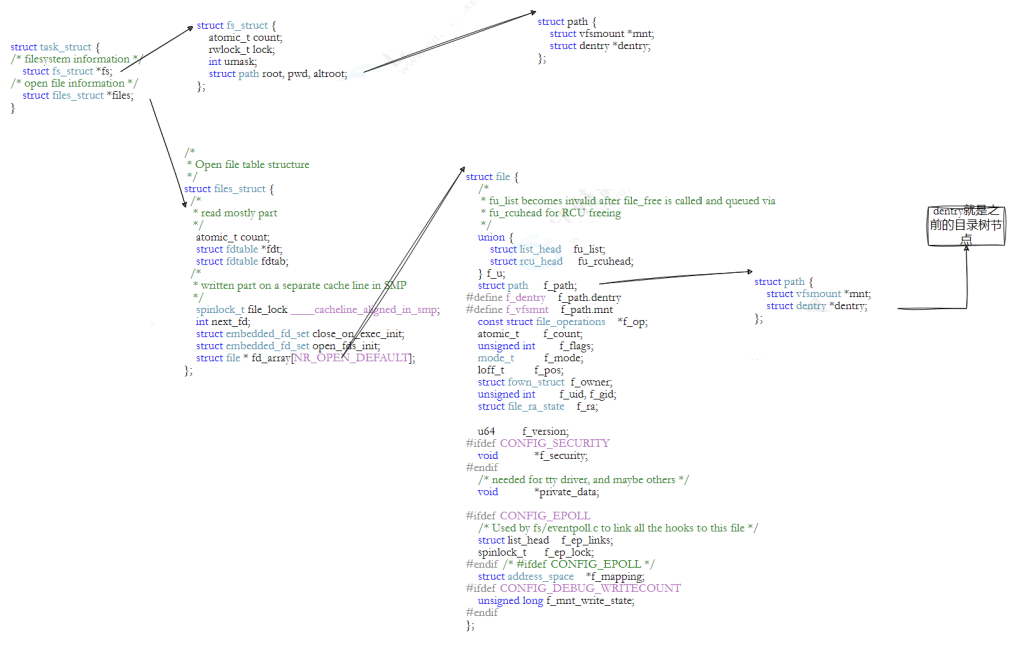
3.9文件系统总结
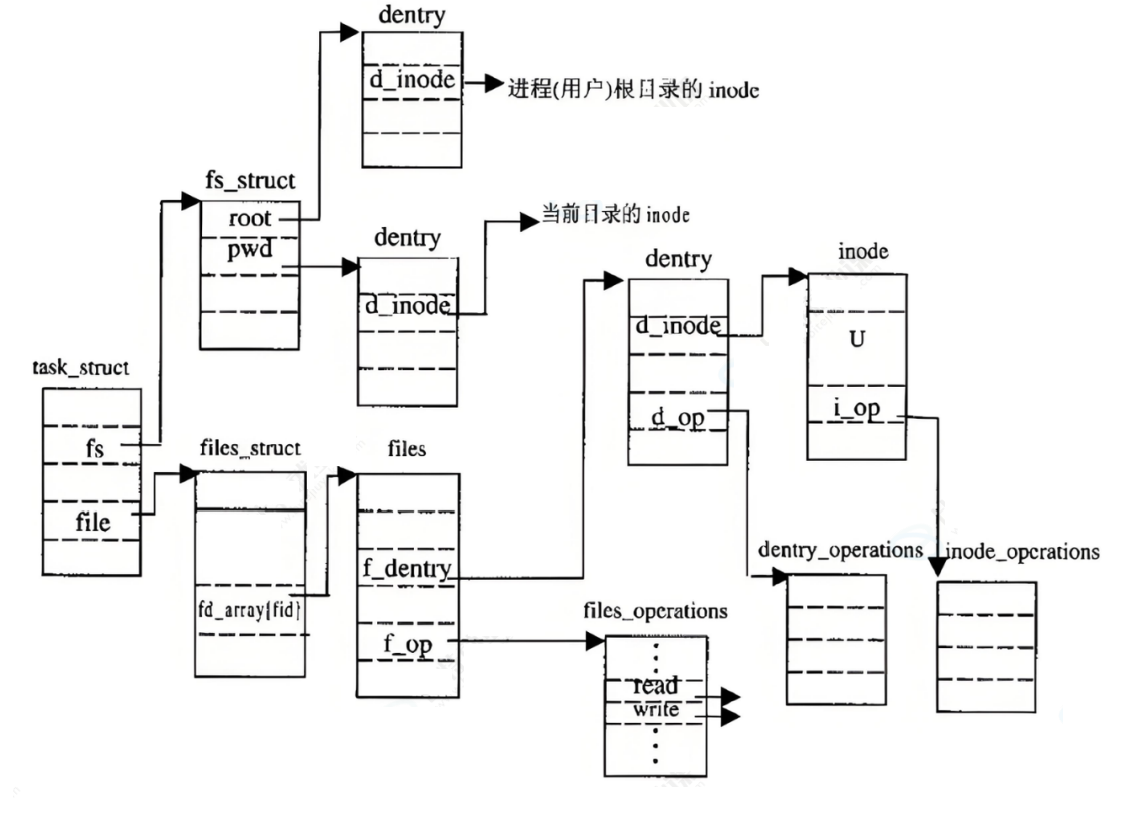
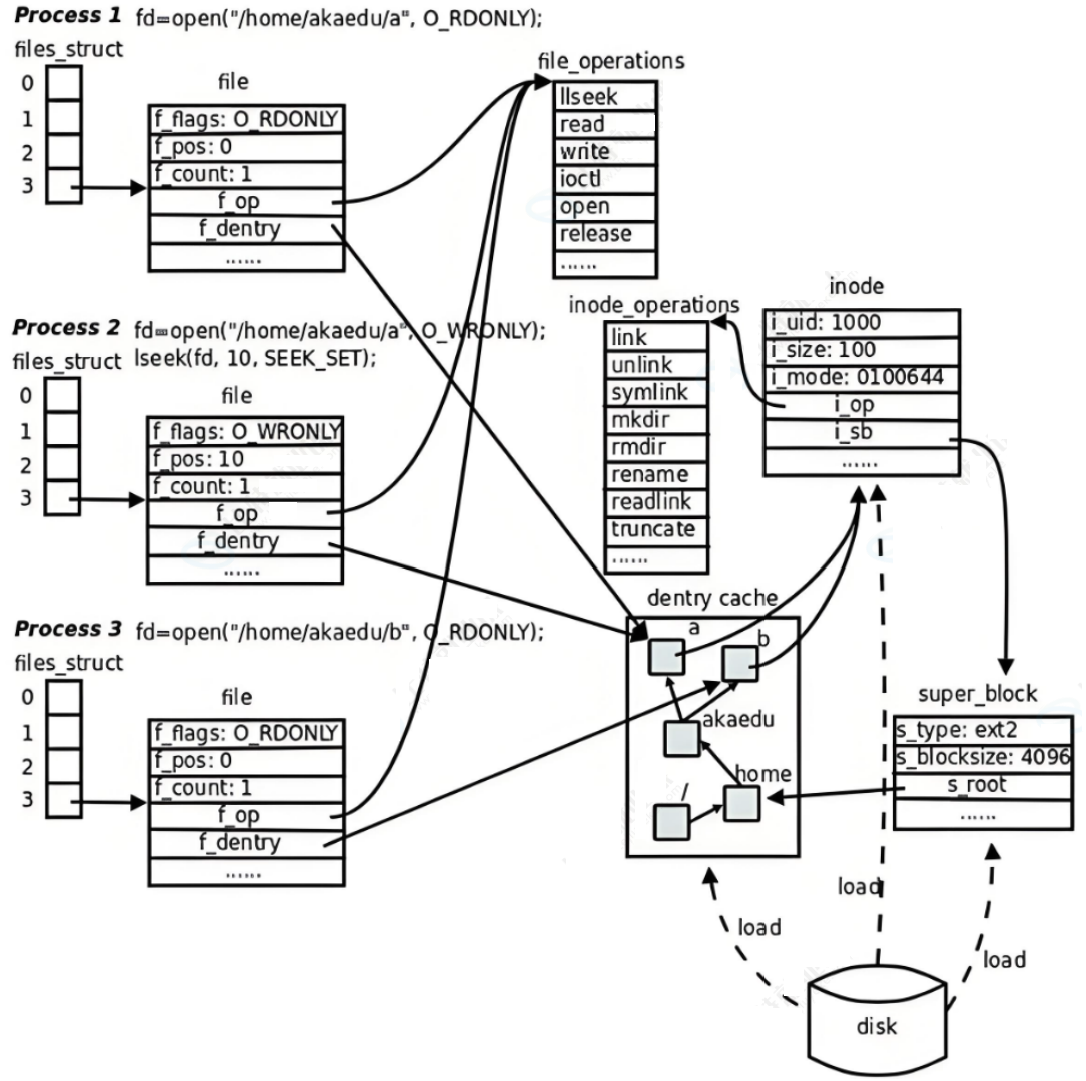
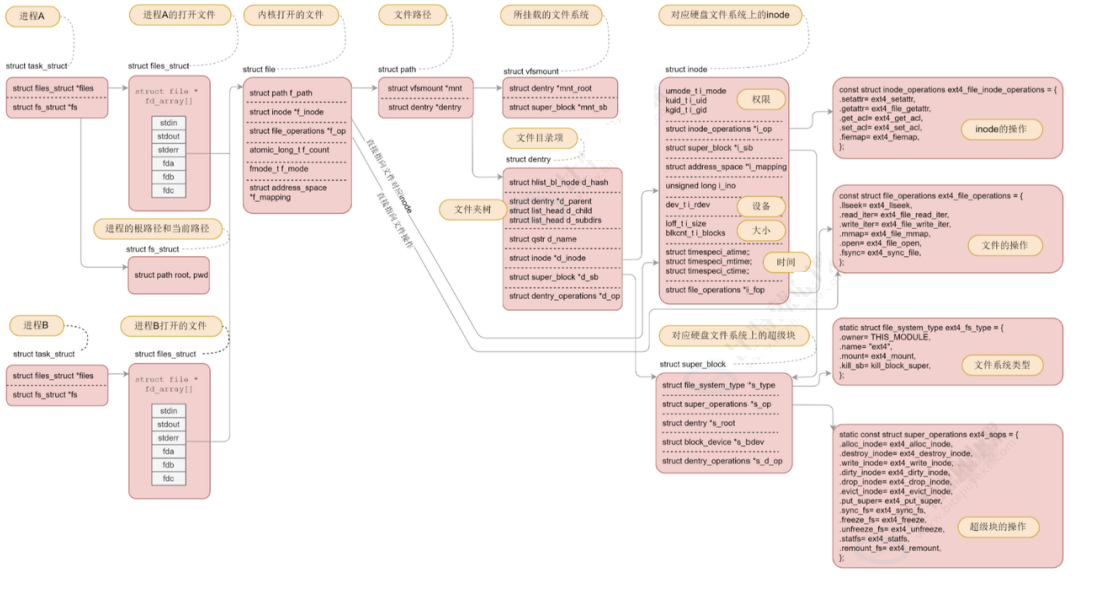
4.软硬连接
4.1硬链接
可以知道,真正找到磁盘上文件的并不是文件名,而是inode。起始在linux中可以让多个文件名对应同一个inode。
[sjx@VM-0-6-centos ~]$ touch test
[sjx@VM-0-6-centos ~]$ ln test hard
[sjx@VM-0-6-centos ~]$ ls -li
total 20
655812 -rw-rw-r--  1 sjx sjx 4178 Sep 29 16:59 26.09.29
656163 -rw-rw-r--  2 sjx sjx    0 Sep 29 17:19 hard
658312 -rw-rw-r--  1 sjx sjx  827 Jul 20 18:04 install.sh
921159 drwxrwxr-x 13 sjx sjx 4096 Sep 27 22:19 linux
658165 -rw-rw-r--  1 sjx sjx  625 Sep 10 20:18 Makefile
656163 -rw-rw-r--  2 sjx sjx    0 Sep 29 17:19 test
●test和hard的链接状态完全相同,它们被称为指向文件的硬链接。内核记录了这个连接数,inode 656163的硬链接数为2
●在删除文件时干了两件事:1.在目录中将对应的记录删除 2.将硬链接数-1,若为0,则将对应的磁盘释放
4.2软连接
硬链接是通过inode引用另外一个文件,软连接是通过名字引用另外一个文件,但实际上,新的文件是一个真正的文件,因为它拥有自己的inode,可以想象成一个快捷方式。
[sjx@VM-0-6-centos ~]$ ln -s a b
[sjx@VM-0-6-centos Test]$ ls -li
total 0
656163 -rw-rw-r-- 1 sjx sjx 0 Sep 29 17:31 a
667405 lrwxrwxrwx 1 sjx sjx 1 Sep 29 17:31 b -> a
656163 -rw-rw-r-- 1 sjx sjx 0 Sep 29 17:32 c
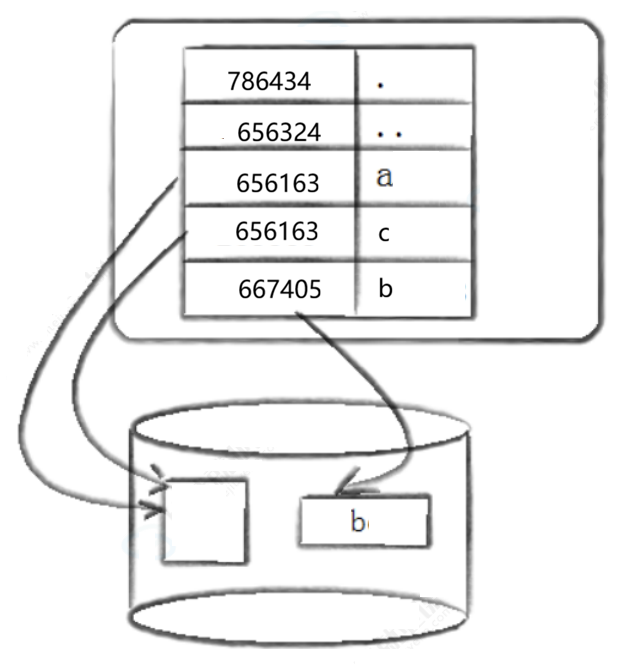
acm
文件的三个时间:
●Access 最后访问时间
●Modify 文件内容最后修改时间
●Change 属性最后修改时间
4.3软硬连接对比
●软连接是独立文件
●硬链接只是文件名和目标文件inode的映射关系
4.4软硬连接的用途
硬链接
●.和..就是硬链接
●文件备份
软连接
●类似快捷方式
转载自 CSDN-专业IT技术社区
原文链接:https://blog.csdn.net/2501_93697341/article/details/166740297

